Have you ever wished your iPhone would ring only when certain people call? Here’s how to do it:
- Download the “Silence” ringtone here: silence.m4r
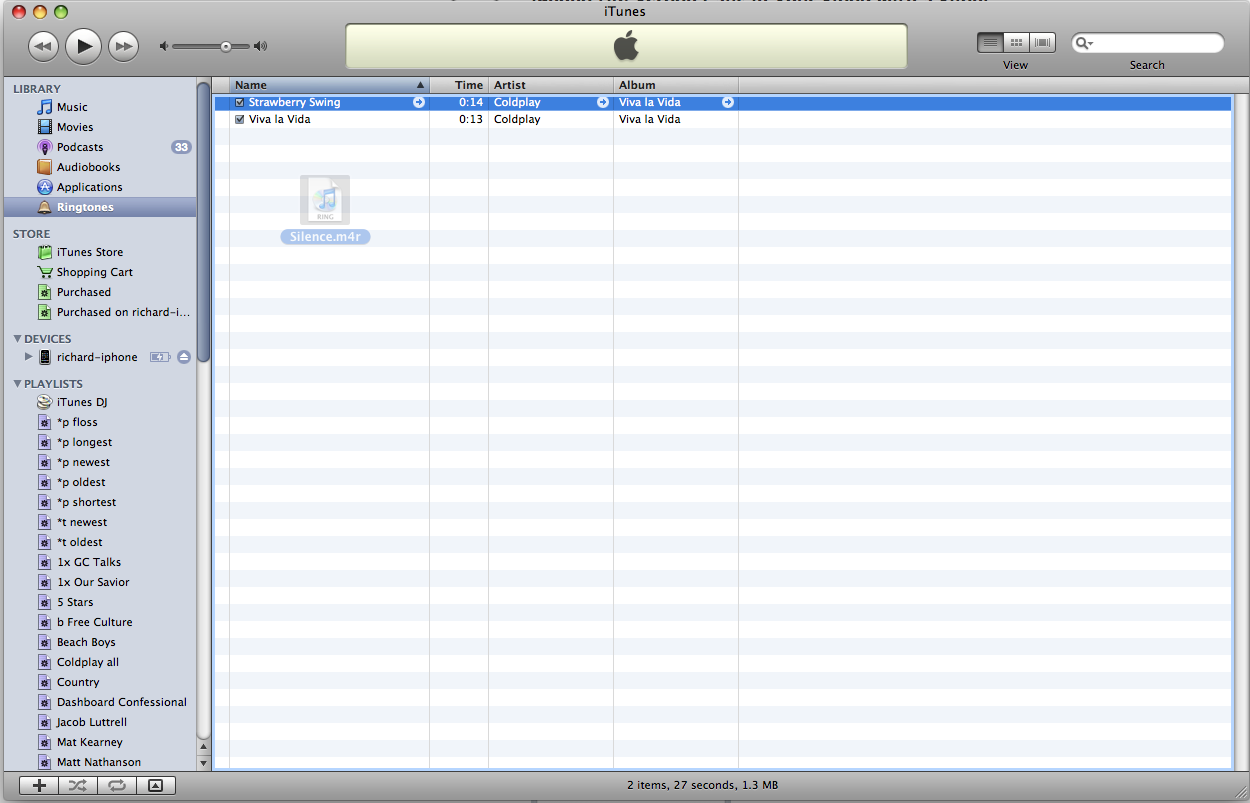
- Copy this file into the Ringtones section of your iTunes. (Click to enlarge.)
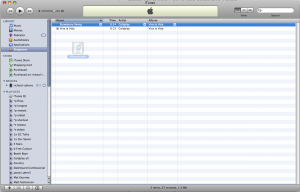
- Sync your iPhone with iTunes to load the ringtone.
- On your iPhone, change your ringtone to “Silence” (under Settings -> Sounds -> Ringtone). You’ll no longer hear your phone calls.
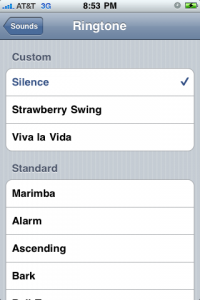
- For each person whose calls you still want to hear, change his or her Custom Ringtone to something audible: Click the name in your contact list, choose Ringtone, then choose something besides Default
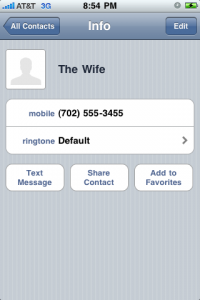
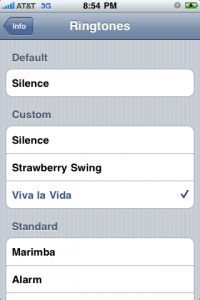


Now you can screen calls in your sleep. Because Sunday afternoons are for napping.
329 replies on “iPhone tip: Use a Silent Ringtone to Screen Calls in Your Sleep”
Thanks for the file. Haven’t installed on the phone, but it shows as 30 seconds?! does that tie up the phone longer than a 2 second ring tone? Any reason you went that long with the tone?
No specific reason for 30 seconds. I think Apple cuts it off anyway, so it doesn’t affect the way your phone rings.
Thank you so much!!
(1) DND works very well
(2) download a silent ringtone and align with your iTunes – this works very well for me. Remember to keep that tone with any sync
I boughta silent ringtone app and the documentation was so bad I had to turn to you for clear, concise instructions. Works great now, although I unfortunately paid 99 cents for the exact same application I could have downloaded here for free. Thanks for your help!
I bought a silent ringtone app and the documentation was so bad I had to turn to you for a clear, simple explanation of how to install and use it. Thanks so much!
Please enlighten me…my iTunes does not show a Ringtone folder and I can’t seem to find a way to create one.
Thank you so much! Just downloaded this to put on as a custom number for a telemarketer number and ONSTAR rep that keeps calling and when you pick up it just leaves you an automated message…
So handy..
Oh my god thank you! No more late night drunken calls from my ex. Goodbye verbal abuse, hello silence!
I downloaded the ringtone and it is in my ringtone folder in itunes. When I sync my iphone, it does not copy over. How can I get it onto my iphone?
I’m having the same issue. I don’t have a custom ring tone folder either. I have bought 2 ring tones & they show up fine, just not this one. Is it silent & invisible???
THANK YOU for this tip. As a small business owner I am barraged by sales calls even though I’m on the do not call list. Many of them are repeat calls from the same numbers. Now I save them as a “spam” contact and assign your silent ring tone to them and no more annoying ringing at all hours of the day and night.
My iTunes program on my MacbookPro does not have a ringtones entry under library. What gives? Thanks
Mine doesn’t either. I don’t see Ringtones listed on my iMac either.
Check your preferences. Under the “General” tab, you can select/deselect what types of media to show.
good tip. Now its 2/2013, and still iphone doesn’t have any call bloacker. I now simply add the number to my ‘Blocked’ contact. This contact has no vibration, no text alerts, no mail alerts and your Silent ring tone. good tip.many thanks!
Thank you! I do use the DND settings when I really need the phone to be quiet, but I really miss being able to assign a “don’t you even think of ringing” tone for those pesky unwanted (telemarketer, SPAM, drunk dialer, etc) phone calls that haven’t gotten the hint that their calls are unwelcome (yes, I do report them to the “Do Not Call List”, but I still want the ability to screen the calls until they actually stop).
Trish –
Here’s how to reset your Do Not Disturb times:
Go to Settings > Notifications > Do Not Disturb. It’s pretty self-explanatory from there.
how can you specify what time “do not disturb” will take effect???
How about turning on the Do Not Disturb option in Settings at night and I think that the lights will not go on your screen.
Good as far as it goes, but…
Is there any way to keep the phone from ‘waking up’ at all? The light when it picks up a call is enough to rouse me, even with no noise.
I would recommend turning the phone upside down 🙂 quick fix!
Thanks Richard… great Post! 🙂
Luis
Use the Do Not Disturb feature in iOS 6, schedule it for the times that you sleep, and the phone will not wake up at all. You can also pick and choose specific people who you would allow the phone to ring from.
Apparently this does not work for MSG from AT&T, as they woke me this morning bypassing the do not disturb feature.
You can turn the brightness of the screen down under settings. It gets pretty low
Awesome.. Thank you!!
MUCHAS GRACIASSSSSSSSSSSSSSSSSSSSSSSSS!!!!!!!!!!!!!!11
Thanks heaps ! … have one very persistant annoyance I have done the above for … perish the thought but I am looking forward to her next call : )
PS ,,, I LOVE the Do not disturb feature of the iPhone 5 !!!!
Old news to many of you, I’m sure, but iOS 6 has the “Do Not Disturb” feature that lets you set up a time no alerts come through, but lets you assign contacts you want to hear from 24/7, or if someone calls twice within 3 minutes, the second call rings through. Finally addressed that issue.
Do Not Disturb is a welcome feature, but unfortunately it still doesn’t silence individual calls (for example, there’s a number I always let go to voicemail, but I do want to get other incoming calls). This silent ringtone is exactly what’s needed, and I’m amazed that Apple didn’t include such a basic option that’s available on much less sophisticated phones.
I just want to say thanks, Richard! Last night I was watching a favorite movie, and I checked my phone when it was over. Do Not Disturb was off, but I did get one call – one that would have been an annoying interruption. Thanks to your silent ringtone, it went to voice mail without a peep. Yay!
Thanks for the write up. I keep getting calls multiple times a day from a number I don’t know. My iPhone doesn’t have a way to block a number, like some phones do. So downloading the silent ringtone seems to be the best solution for me right now and it was very easy to do. Maybe the new iOS 6 will give me the option to block calls… we’ll see.
WITH IOS 6
Thanks to this site, this is what I’ve done to avoid being woken up by unwanted callers or text messages – I.e. how I’ve whitelisted numbers without resorting to jailbreaking my iPhone 4S (iOS 5.1.1).
In addition to Richard’s instructions…
In Settings > Sounds > Ringers and Alerts, I …
– Set Vibrate to OFF,
– Set the (default) Text Tone to “None”.
Then in Phone > Contacts, for each contact that I want to allow to wake me I have changed the “text tone” as well as the “ringtone” from “Default” to a non-silent choice.
Notes:
– Obviously, this arrangement makes other calls/texts silent all the time, not just when I sleep, and also prevents Vibrate for all calls received. (This suits my purposes, and if I need Vibrate while I’m awake, I’ll try to put up with having to turn it On/Off daily.)
– I do not have email set up on this phone, so email notifications have not been considered.
– I thought that I would still have a problem with New Voicemail notifications (I.e. getting a New Voicemail sound when a silent/unwanted caller leaves a voicemail message). I expected to have to set this sound to non-silent when waking, and back to “None” when going to sleep. However, I was surprised to find that setting the default TEXT TONE to “None” also silences the New Voicemail notification, regardless of the latter’s setting! I’m trying to find out if this is carrier-related, or an iPhone or iOS anomaly. Until then, if during waking hours I want to hear Voicemail notifications, I may have to toggle the default Text Tone daily.
I may reconsider jailbreaking and a whitelisting app if daily toggling of Text Tone and/or Vibrate settings become too much of a nuisance. But in the meantime, I’m looking forward to fewer sleep interruptions.
Thanks again!
If you have jailbreaked your iphone. RingerX can let you silent all calls from blocked/anonymous number.or assign a special ringtone
Great idea! Thank you so much!
Thank you, Richard. Thought that I’d share my experience with this issue.
I work nights and sleep days, but need to be accessible to a selected few in case of emergencies. My unlisted-number iPhone 4S was purchased for the job – it is left next to my bed so that I can be woken by the selected few if an emergency arises. But I’m sick of being woken up by unwanted calls and spam text messages. (I don’t use email on the iPhone, so that’s not a problem.)
I went searching for a whitelist app, and discovered that jailbreak is a prerequisite. Didn’t want to do that, but resigned myself to it until I stumbled across your simple alternative.
This is still theoretical, but it seems that a similar workaround can be used for unwanted text messages. In “Sounds”, I can set the default “Text tone” from a list, OR SELECT A RINGTONE. (I am assuming that when I add your SILENT ringtone, that will be one of the choices.) And in “Contacts”, I can give any Contact its own Ringtone OR TEXT TONE.
If that’s the case, I’m much closer to a solution but still have some loose ends. When an unwanted call rings “silent”, how do I avoid the sound that accompanies the “Missed Call” or “New Voicemail” alerts?
In “Sounds”, it appears that I can set the “New Voicemail” alert to the silent Ringtone (in the same way as the default Text tone). But if that’s the answer, I may need to reset that sound to “normal” each day when I wake, and reset it to silent when I go to sleep. (Contacts don’t allow custom “New Voicemail” settings.)
As for the “Missed Call” sound, it doesn’t appear explicitly in “Sounds”. I may need to experiment to find out if it falls under another general heading (E.g. “Reminder Alerts”?). But even if it does, and even if the appropriate category allows a custom ringtone as its default, I think that it will be like the voicemail tone in that I may have to reset it twice each day.
Or maybe try to train myself to be woken up by ringtones but not by shorter alerts? Or re-consider jailbreaking? But I don’t yet know if black/whitelist apps also prevent those related alerts.
Any more thoughts anyone?
Check out the Do Not Disturb feature in iOS 6.
Worked perfectly! Thanks!
I am looking for an app/setting like “Sleep Ringer” (Android/Blackberry) so I can turn off all sounds except calls from my wife or child’s day care when I’m napping or teaching. I can’t believe Apple can’t figure this out (or allow applications for it). Thank you!
Check out Do Not Disturb feature in iOS 6.
Thank you
Thanks a ton!
Thanks for the ringtone Richard; for others who find this and want to also disable the vibration function for certain contacts (likely the same ones you want the silent ringtone for), it’s possible to do by enabling custom vibrations under Settings -> General -> Accessibility. You will then have the option to assign a custom vibration per contact to go along with the custom ringtone, and one of the built-in options for vibration is “None” (unlike the missing silent ringtone that Apple should have provided from the start!!). Thanks again Richard, hope this helps others.
Wow, thanks! Someone in CO keeps calling for someone I don’t know. This is the best solution I have found for an Iphone.
I am so thankful I found your site with this ringtone. I could give everything but the ringtone a silent ring. This is AWESOME!!!!! I’m having surgery and I really don’t want to be bothered by everyone I know, even though I know they mean well. And now, to those sneaky telemarketers who bother me…hahahahahaha. No soup for you!!! Thank you!
I have synced it and all, but can’t find it on my ipone & it doesn’t show up under ringtones either
I got it! I had this ringtone for my 3GS and now for my Iphone 4. Works great. AND, I can still hear my alarm even though my calls will be silent. Yeah.
I got it! I had this ringtone for my 3GS and now for my Iphone 4. Works great? AND, I can still hear my alarm even though my calls will be silent. Yeah.
THANK YOU!!! Finally a silent ringtone that works!!
Thank you!! I’d been wanting to silence all the sales calls that I get. This is the perfect solution!
Thank you. Used this on a persistent 800 telemarketer. Yess.
Thank you! Thank you! Used this tonight and it worked like a charm!
does anyone know of a way that I can set my Iphone 4 to only hear an SMS from one particular number at night ? I am an emergency service worker and get call outs by SMS but I really don’t want to wake up to any other texts or phone calls.
Check out Do Not Disturb feature in iOS 6
Amazing. I just went from Android to iPhone because I couldn’t get a decent sync of my contacts and calendar on my MacMini. That works fine now with the iPhone.
So, I’m looking for an app that will silence my calls (with a list of exceptions) and there isn’t one. Android has one that will silence between any given hours for any given days and has an exception list. And it was free.
Come on iPhone developers. Surely you can do this!
Thank you!
Verizon users can block phone numbers by logging onto their Myverizon acct>plans and services>view all. Numbers can be blocked for 90 days at a time. There is also message blocking and Internet spam control. This is a FREE service.
Thank you so much. Brilliantly easy.
Apple has taken the MrNumber down.
Thank you so much!! Telemarketing calls are starting t show up on my iPhone. I am so glad to have this ringtone!
Pretty sweet. Nice and easy the way I like things.
On my previous blackberry, you could create custom profiles so at night I could set it so that I could still hear phone calls and texts (teenagers out and about) but no audio notification of emails. During the day I could change the profile to alert for all notifications. Is there any way to do this on the iphone?
Ideally there are a few contacts that I would like to alert me 24/7, while everything else could be turned on or silenced.
Thanks so much to record this special “silence” ringtones, good job!
Thanks for this audio, a crazy guy, call me all day long to bother me, so, with this, i will know.
thanks a lot.
Thank you! This was incredibly easy to implement…even for a tech newbie like me. 🙂
Thanks, silent ringtones on iTunes are .99, really thanks a lot.
I was using this ringtone happily on my iphone 3gs, but now it has died.
I’m using my old LG shine cu7200 for a while until I decide on a new carrier. It seems to want an mp3 format. I tried texting the ringtone from my computer, but it wants to save the data as a contact.
Next I will try a microSD card. ANy idea if this m4r will work?
Thanks so much!
I have been trying to figure out how to silence unknown callers or to set a “none” ringtone to a contact, just like you can select “none” for text, and still have my phone on for wanted calls. Honestly I’m surprised Apple didn’t already provide this. I have talked to a few people at the Apple stores and even sent a couple suggestions to Apple online and no one ever responded to my suggestions and the people I talked to were not even aware that this was possible. Out of the blue I decided to search for “silent ringtone” and voila, your site appeared. Thank you so much!
OK, worked out how to do that, it created the folder by itself…… sorry never have done that……… works beautifully, thanks for the very useful tip……
I do not have a ringtones section in my Itunes??? Great idea, would like to do it… help please!!
Make sure “Tones” are set-up to be seen by going to iTunes>Preferences…>General. There you will see all the features (Movies, TV Shows, Podcasts,…, Tones, …) that can be displayed when checked.
I didn’t have a ring tones section either until I dragged the .m4r file onto iTunes. After I did that I was able to copy the file to my iPhone 3GS.
I didn’t have a Ringtones either…It was called Tones. Under Library.
Too bad the iPhone doesn’t come with this “ringtone” pre-installed.
You would be surprised that Android actually has something better: a ‘reject list’ that you can add a contact to, and not only you do not need a silent ring tone, the person is automatically getting busy / vm without your phone alerting you in any way (which saves on battery if the abuser is really determined, and keeps your line clean for other calls).
Maybe iPhone has that too despite being usually technically inferior to Android, a fact, that from some reaosn, does not stop people from re-buying that product every time its version number change, without any actual improvement (still a locked garden) (Siri is nice for showing off on YouTube, but on day-to-day phone use, widgets that has the same data would get the results faster… so don’t tell me Siri.)
Simple my intellectually superior friend. Not everyone cares about specs. Form over function is an imbalanced perspective. People like balance, beauty, Simplicity, elegance and genius. Sure I sound like a fanboy to you now, but I personally swing towards originality. Android and iOS are oranges and apples.
Which do you like? I like both. Form and functionality in balance.
It seems to me that for as sophisticated as the iPhone is that there would be an easier way to just assign a silent ringtone to a few particular contacts insteacd of what is suggested above. Am I missing something here? My old style phone actually just had a ringtone that was “Silent” and easy to just assign it to whom I wanted.
Thank you, Richard.
For others, make sure you have iTunes set to sync “tones” for your device.
Does the “silent” default ringtone this also silence incoming SMS notifications, or is that just a matter of another keystroke?
I spoke too soon. The ringtone is grey’d out in iTunes and won’t sync with my new iPhone 4.
i second that
I added the ringtone to my iTunes Library/Tones and then performed a full sync with my iPhone 4S. iTunes is, indeed, set to sync ringtones to my iPhone. The ringtone appears in the list of “Tones” for my iPhone within iTunes, but it is greyed out in the list and it did not transfer to my iPhone. I’ve tried this several times. I am using iTunes for Mac 10.6.1 (7) with Mac OS Lion 10.7.4. Any suggestions?
Hot Dang. I was looking all over for just this thing. I created a contact called “DNA” (Do Not Answer). And assigned it this ringtone. Telemarketers and other annoyances now go to VM for screening. Thanks again.
Thank you!! unknown old lady from another country keeps calling me at 5am, no matter what I say she just says “hello?” and then eventually hangs ups and calls back. Now she can just talk to my vm while I slumber on. Bless you!!
THANK YOU!! This is HUGE, as I compiled a bunch of spam calls over the months.
I work midnight shift and needed to leave my phone on during the day while I slept. This solves a huge problem. thanks
I want to thank you so very much for the “silent” ringtone. This is an excellent way to screen those nuisance calls. The intrusion of these calls has been stopped. Thank you Richard.
I can see the ringtone in ITunes- bell tones, and I have synced the iPhone4, but the ringtone appears grayed out in the iPhone tones menu and does not appear on the phone under ringtones. Any ideas for a fix on this?
really great especially when you are trying to sleep at night yet you still want to wake up to your alarm for work in the AM. 🙂
richard k miller you are wonderful, this is an excellent way of avoiding annoying calls, thank you
I cannot thank you enough! Great directions and very simple to do!
Thanks for the detailed how to. You’ve saved a lot of people a lot of grief.
Blessings to you in this life and all further incarnations for this little tip! 😉
They don’t want you to have the ability to block calls, or silence them, because then you could do it to their “spam” automated/moron callers.
Thank you! This is exactly what I was looking for!
Thank you so much for this solution!! I have never used ringtones and use vibrate for sound and then then silent when I don’t want anyone bothering me. I was wondering how I could cut this ringtone so I can make a shorter one for text messages. Thank you in advance for letting me know!! I tried in iTunes but it didn’t give me the option (probably because of the file type).
silence.m4r. a simple yet elegant solution.
THANK YOU THANK YOU THANK YOU
Apple should definitely fix this, because how ever simple this “fix” is, this is not a solution. yes it silences the unwanted callers, but still all the notifications, text messages, emails, etc all make noise.
I work nights, so sleep in later than most people, but have parents who are old. I would like to be able to get my night’s rest, but still be reachable in case of a heart attack or something…
(even the new mail sound wakes me up)
thank you – so easy – i should have known myself
greetings from austria
Thank you a lot. I had a BB before, and the best thing in his ring tones was a mute options. It does come handy.
Thank you. A great solution. I had a BB first, and it had a
I have a contact called “Do not answer” that is for all of the telemarketers who repeatedly call me. I just made that ringtone be “Silence”, so I don’t get distracted. AWESOME!
I don’t understand this concept. On my old-fashioned phone I was able just to go to the one contact I wanted to silence and put the ring tone silent. Does the iPhone do this ? I appreciate your advice and it seems at everybody else did too however it certainly seems like a cumbersome way to silent one phone call one contact when this is supposedly a smart phone?
what if some of your contacts are already assigned custom ringtones. will they go to silence once you set the default to silent or will you have to change all contacts with custom tones to default and just enable the ones you want to ring?
i’ve been getting a spam caller in the middle of the night for over a week. bought a call blocking app on iTunes & that turned out to be another scam!! your ringtone saved the day!!
I’ve tried to make my own and they sucked. Seached google “silent ringtone”. You were first. You are a god.
Rock on. Thanks much.
My silence/ringer switch recently broke, and I couldn’t believe that Apple hadn’t put in a “none” option for the ringtone – but this was perfect! It’s a little bit of a hassle to keep changing settings, but I would rather do that than spend $100 fixing the stupid thing. Thanks so much for the detailed tutorial!
This is a great concept, however if your using an iphone for business use and you want to do this for incoming emails. So for only a emails coming in I want to be alerted…all other emails I want silent…does every email that I could potentially get have to be in my contacts then?
Does it have to be the silence.m4r?
Can I put this on my iPhone and tell it to silence certain calls I recieve, not all of them? I don’t want my default to be silent, then I go back and change my other 200 contacts that I do want to hear from to ring. I just have four numbers I’d like to be silent, so can I go to those four individual numbers and make THEIR default ringtone silent, not ALL of my contacts?
Yep!
Any similar tips to block text messages (from coming in at all, and not just silence)? Such a simple requirement has yet no app (except jailbreak, which I don’t want to)
Unfortunately, I haven’t seen a way to completely block texts.
thank you for posting this — this will give me many nights sleep — THANK YOU
hi-do you have to use the exact silence.m4r ?
Dude, thanks so much for posting this file. You rock!
Excellent piece of kit thanks very much …
Nice write-up. I needed to set a few alarms that will only vibrate, but there’s no such option in the settings section. I followed your instructions, set up a few test alarms and the vibration worked without any sound played!! THANK YOU!!
Just another heartfelt thank-you for this excellent solution! My British carrier, O2, don’t have a clue about nuisance calls, and only offer to change my phone number, which really couldn’t be more inconvenient! Have a great Christmas.
This is great for the ex that I dont want the phone to ring!
I made a phone contact called Spam and just gave it the silent ringtone. Now whenever I get a spam call I add it to my spam contact in the address book and hear from them no more. Thanks for the quiet.
This is a terrific solution, but am I missing something? Why make the silent ringtone one’s default and then assign special ringtones to all of the contacts whose calls one does want to accept? It seems to me it would be far simpler to leave all one’s ringtones “as is” and just assign the silent ringtone to the much smaller group of contacts whose incoming calls one wants sent directly to voice mail. Or like I said, is there something I don’t understand that makes that not possible?
Joe your approach is probably best for your circumstances. Personally, I only assigned the silent ringtone to ALL contacts when I was trying to take a Sunday nap and only be interrupted by certain people. Most of the time it’s the other way around.
Many many thanks – this will save the day – I have a number of contacts who seem totally unaware that 02:00 is not the time for a casual chat – “silence” keeps them at bay
This is a great idea, yet simple. Thank you very much!
Thanks man!!! This is really really helping me. Really :-). -bart, holland
I HAVE IPHONE 4S ,, I RECIBE TOO MUCH PRIVATE O BLOCK CALL MY CELLULAR ,, SPRINT COMPANY ,,, PLEASE HELP ME TANKYOU
Thank you, Thank you,Thank you! So many websites tell you different ways to make a silent ringtone…but not all of us are that tech savvy! So again….Thank you!
What a clever “work-around.” Having said that, isn’t it curious that iPhone hasn’t “fixed” this glaring deficiency?
In a place far away, in a different universe, this setting would automatically trigger after hours so I wouldn’t have to make the change every single night.
But QED can’t be greedy.
Tried asking Sprint and they haven’t a clue about their new iPhone equipment. First they said it was possible and gave me an incorrect solution, then they punted.
THANKS MUCH!
thank you thank you THANK YOU soooo much! <3
Well when you select this as the default ringtone it will silence all calls EXCEPT those contacts you have assigned a specific ringtone instead leaving as default
Does this silence.m4r automatically silence all calls coming in? Or can I select it only for certain callers? Thank you for your help.
thank you so much very useful
I have to say deeply thank you for this solution.Its so helped me.thank you buddy
For a smartphone, the iPhone’s phone functions are severely limited. My old SE K700i from years ago was able to create profiles and filter calls from the address book. Why is it so difficult for Apple to add these features? I’m sure these features have been requested since the first iPhone.
Hi Richard. I downloaded the silent ringtone and that worked but when I selected the audible tone for selected contacts the phone still stays silent. Do I have to download from I tunes a ringer to be paid for, for this to work properly? Thank you very much ahead of time for your help.
Bill
Hi Bill, you don’t need to buy anything on iTunes to make this work. There must be some other reason that audible tones aren’t working for selected contacts? Do they work when the silent ringtone isn’t your main ringtone?
Thank you. That’s a great help to eliminate unwanted spam calls.
Thanks for posting this information!!! Much needed!!!!
U can buy for $1.29 a silent ring tone in iTunes if u don’t want any hassles.
I just update to Iso5 and having a problem locating th file on my phone. It is not there.. I tried dragging it to itunes and still dont see it on my phone. Please help..
Fantastic what more can I say peace at last thank you.
I had a silent ringtone until I upgraded to the iOS5 on my i4
I followed the steps above and it’s in the phone but doesn’t show under ringtones.
Any ideas?
Thanks, Michael.
Michael,
It should be listed at the very top of the ringtones, above the standard iPhone tones, not in alphabetical order.
Kirk
Thanks Kirk.
I have tried everything and it shows in my phone on iTunes but doesn’t show in the ringtone menu. I had it working with the old OS – may have to wait and see if there is a fix found.
Michael.
See my reply- October 28.
Niel
Thanks down loaded the Silence ringtone again and just had to select it again in the iTunes ringtone section and sync again Voila it works again
Thanks again for the tip
An Update: While the file is showing in iTunes the actual file was missing. I had to relocate the file on my hard disk and re-add it to iTunes.
Then sync’d it across to my iPhone and now all working properly. Whew!!
So, Shuja, looks like all you have to do is download the file again, and add it to iTunes
I’ve just upgraded to iOS 5, and like Shuja, the silent ringtone has disappeared off the iPhone. It’s still in iTunes.
Need a fix to this …!
Whenever the OS on phone is updated, purchased, borrowed, etc., any tone
not included with ‘original’ tones are deleted by the update process. I’ve learned this the hard way after multiple experiences.
Best to save ‘optional’ ringtones, answer tones, etc., in a directory on your hard drive. Then following any OS update you simply copy or drag your ‘optional’ tones into iTunes; then sync. ‘optional stuff’ will not appear in your phone settings.
Hi
I have ben using your Silence Ring tone to great effect.
However after upgrading to iOS 5 your ring tone no longer is availableIs there a fix to this
my gf call me every time nd becoz of her i silent my phone , bt nwi ataach this tune to her contact
nd then enjoyyyyyyyyy……. 🙂
thanx.
Just wanted to say thanks for the .m4r file
Ta Da! You are amazing.
Is there any way to group people, as in the older Nokia phones? For example, I could group Family and friends and only calls from those numbers would ring. The problem with silence, is that you would get called from a new spam number, and it would ring the default tone. With groups, you could set the phone to ring, say, while asleep, or busy only when a specific group person called you
I have iTunes 10! help!
What do you need help with?
Brilliant!!!! Thank you! =]
Rich, Your ringtone is awesome! Thanks for coming up with a great solution for unwanted callers. I do have a suggestion. Maybe in your next update you can also make it so that the phone also turns off the vibrate mode for the numbers that we have designated in the silent ringtone, i.e., the irritating unwanted callers. This way, we wouldn’t ever notice if one of these callers called until much later when we checked our phones.
Best regards,
K
As far as I know you cannot do this for individual contacts. If you don’t want the phone to vibrate unless the silent switch is on, go into settings and then select sound. The first switch you’ll see is vibrate. Leave this one set to “on” if you want your phone to vibrate when you switch it to silent mode. If you scroll down you’ll see another vibrate switch just above the ringtone switch. Switch this to “off”. Now your phone will not vibrate when it’s not in silent mode.
Sarah,
OK, since the new OS just came out for the iPhone, it allows custom vibrations for any contact. You can also completely turn of vibrations for any contact and keep vibration on for other contacts. This is sweet!
Really? Can you tell me how you did that? I’ve updated to the new OS but the settings for vibrate don’t seem to be any different for they were before.
A couple of different ways. Rixx has found way. But you can also go to Settings>Sounds and under you custom “silent” ring there should be a slide key that turns off the vibrate for all contacts set for Silent.
You may also go to each contact hit edit and scroll down to vibration and and click None.
See my instructions below to also ditch your collectors and telemarketers with an SIT (Special Information Tone) that is available as a way to stop unwanted robo auto dialers.
I have ios5 but can’t find where you can set custom vibrations by contact. Is it in the individual contact? I don’t see it. Perhaps it’s not enabled in older phone? I have 3GS.
Found it. Settings > General > Accessibility > Hearing > Custom Vibrations
Turn on. Then the ability to set a vibration for each contact shows up when you edit contact.
Brilliant! Adios telemarketers interruptions.
Cool, also, if you want to have telemarketers and collection companies robo dialers to stop calling you you can also go to a company that has a free voicemail that overrides your carriers. I’m using youmail just go to their dot com and sign up. They have specific outgoing messages for specific telephone # that you input. What happens with these specific outgoing message is that a SIT (special information tone) (defined on Wikipedia) that gets played. You know the one that you hear when you’ve reached a disconnected #. That specific tone tells the robo dialing computer that your phone # is no longer working. The calls stop almost instantly. It then has a message saying that your number is disconnected. It’s sweet, and fully programmable for a specific caller. Good luck
Got it! Thanks Kirk and Rixx for the tip.
can’t seem to open silence.m4r
you are a genius. thanks so much.
You are a champion for making this available. Now to read up on this jailbreaking of which you speak!
You sir, are a true patriot and gentleman! A nice solution to these telemarketers who call to convince me that “mortgage rates are at an all-time low” or that male enhancement capsules will make me irresistible to women! Thanks much.
I wish I could do the same for vibrate. I need vibrate for calls I want, but somewhat defeats the purpose of the silence ringtone for those I don’t. Any thoughts on this?
I have an iphone 3G, and a “blocked” number keeps calling me. How can I block them? I’m with AT&T and they have offered no help. I know you can block a call on a land line, but what about the iphone?
Hey evelyn, not sure that’s possible on the iPhone out of the box. Maybe if you jailbreak it.
Brilliant. Thanks.
Thank you SO much!!!!!!
I had stayed up till 2am doing homework and had just enough time to get 8 hours of sleep before class, unfortunately this annoying person called a 7:15, 8:20, 9:43, and then again right after 10…
It is okay now that I know it will never happen again.
Thank you again Sir, You, are Awesome!
Exactly what I was looking for. Many thanks.
Perfect!!!
With hotels/airlines I usually give my cell as a contact number- and I’ve been traveling a lot lately. Not sure what happened or who is responsible, but suddenly I’m getting these telemarketer/bull$hit/hang-up calls 2-3 times a day, from a over a half dozen (and growing) numbers-
Now, I have a nice new contact called “Annoying Cr@p” (and a wonderful image of a stuffed dogtoy of poop that appears if I happen to see them calling!) with a silent ringtone and no text tone (haven’t gotten texts yet, thank goodness, but these calls are relentless).
My husband saw it and thought it was great- thanks, Mr. Miller!
One interesting item- sometimes, when I copy and paste a number into my “A.C.” contact, it doesn’t automatically get assigned to the “Silence” tone (Contact ringtone shows as “multiple”) so I have to manually switch it to the “Silence” ringtone. . . an extra step that I don’t mind, at all 🙂
I can’t thank you enough!! I am so tired of telemarketing calls on my cell phone and have been looking for a way to block calls – this will work great as now I won’t have to hear them!
THANK YOU, THANK YOU
I applied online for health insurance and made the mistake of entering my cell phone number. I must get 10 calls both night and day trying to sell me insurance. Your SILENCE is golden – and directions simple!
Thank you for this. I just installed it. I’ve had some tough financial issues and the calls are incessant. You’ve helped me gain some sanity.
Much appreciated,
Frank
Which versions of Itunes will do this. My version 10.1 does not have ringtones anywhere in the menu. Am I mistaken? Please help
It should be under Library in the top left of iTunes. You may need to open iTunes Preferences and check the box for Show Ringtones.
The ringtone section doesn’t appear on iTunes until you actually have a ringtone file (.m4r) present. After you download silence.m4r and click on it to open it, or drag it into iTunes, the ringtone section should appear. After that you can choose the option to sync it with your phone. Hope that helps!
Very helpful! Thanks, Sarah!
No problem! Thanks to your awesome silent ringtone I can now ignore the phishing scam robocalls that have been driving me crazy for weeks. Thanks so much for posting this!
I downloaded the ringtone and copied into my rintones section on iTunes and synced.. however ringtone not showing up on my iPhone.. any help?
Hey Shenna, are you able to see the ringtone in your RIngtone section of iTunes? When your iPhone is connected, in the syncing options is the option for Ringtones checked?
Thanks, this saved me from making one myself. I’ve use silent ringtones on previous phones with great success – each new annoying caller gets added to my “silent” contact with this ringtone already setup.
Great Deed! This is great Thanks,
You are a star! Exactly what I was looking for!
You sir are a life saver! I’ve just been woken up the last time by an idiot I’m trying to ignore who phones me at 4am all the time for no reason. Brilliant, thank you so much! (Also that iblacklist is apparently a total scam, if you read the reviews)
The iBlacklist in the AppStore is a total scam. It steals from the legitimate product by that name. The iBlacklist Joe was referring to is available only on jailbroken iPhones, either via Cydia (a AppStore-like interface that allows the downloading of apps from sources other than Apple) or by downloading the installation package using an online source and then transferring it and installing it onto the phone (not normally something I’d recommend an average user try).
Until Apple adds “profiles” to iOS (eg: mute between midnight and 8am, quiet ring between 8am and 5pm, etc), this will do nicely.
This is just what I was looking for. I have someone who is annoying the heck out of me and anytime she texts or calls I get major anxiety. Costs $35 to change my number and too many good contacts have it so didn’t want to have it changed. I tried jailbreaking my phone and installing MCleaner, BUT is crashes with my OS version 4.3.3. So I created a contact called ‘Blocked’, set the SMS notification to none and the ringtown to your ‘silence’. I have added other unwanted contacts (bank and other services marketing etc.) to the Blocked contact list so I don’t even see who is calling. So if Blocked comes up on SMS, I just delete it without reading, and if Blocked calls, I no longer hear a ring!! Best part too is that if ‘Blocked’ leaves me a message. I just click delete 🙂 Might changed the name from Blocked to Satan Calling so it’s some sort of fun.
Thanks!
Thanks a lot – a very elegant solution for my “cold call”-problem!
Great App. Easy and the best out there. Major brownie points for you!
thanks man!
Wondetful for blocking telemarketers when your phone or service won’t block numbers. They can call, but you can’t hear them and they won’t disturb your day! Just another number on your recent list to be ignored.
Sorry if someone already mentioned it, but…
If you are willing to jailbreak, there is an awesome app called iBlacklist. It costs $12, but is incredible if you have people who you want to block. Any numbers you put on the blacklist won’t even ring in on the phone. The only way I even know I miss the calls is because I get a notification from google voice when the call is silently routed there. Even better (and something you can’t do simply by setting up a silent ringer), you can select for it to handle unknown and restricted callers in the same way. You can also set up a whitelist. Let’s say that you don’t want to be disturbed by anyone for the next few hours, but at the same time don’t want to miss a call from one or more specific people. Put them in your whitelist and enable it during that time. It’s very cool, if you aren’t afraid of jailbreaking.
Hi
I had gotten used to this feature on my previous Nokia phone and could not figure out how to do it on my iPhone.
Great, this is so simple and works like a dream
Thank you for making me a well slept man in the morning
fantastic night worker now only people who need to wake me or kids while napping in day
thanks
You sir… are a scholar and a gentleman… Thank you.
This is probably creeping elegance, but could the program only key on certain area codes (800 or 900 etc.)?
couldn’t you make a contact with the name of, lets say, 8900 and set your unwanted calls to the silent ringtone? Ah, Mr. Miller can make it more automatic I bet. 🙂
Thanks for that. I’ve got some nutbag that likes to phone at 2 in the morning but I can’t turn my phone off because of work. So this is a real lifesaver! What I can’t understand is why Apple saw fit to give us the option to assign ‘None’ to a particular contact’s text tone but not the ringtone. That’s the kind of ill thought out crap I expect from Microsoft!
Genius!! This has not only made my day… this has changed the quality of my life. THANK YOU!
Worked like a charm to SHUT THEM UP!
Bye Bye bill collectors!
Call me back when I have a job!
Brilliant!
A friend linked me to your page and directions for uploading this silent ringtone. I was devasted when I switched from my Blackberry Curve to my iPhone 4 yesterday and realized there wasn’t an option to silence calls while I sleep during the day (3rd shifter), and yet still allow important numbers like my childrens’ schools to ring through while I’m sleeping. This totally solved my problem!! Thanks!!!
Thanks a zillion 😀
Thanks, this is the perfect tone for the annoying ex-wife.
This works like a charm. Thanks so much. Job well done!
I thought I did, but I didn’t. That took care of it. Thank you so much!
I have an iPhone 3GS and iTunes 9.2.1. I downloaded the ringtone (Firefox browser); it went to my desktop; I dragged it to the ringtones screen on iTunes without any difficulty. I synced my phone and…..nothing. Any idea of what I should do to make this work?
@Ann: When your iPhone is plugged into iTunes, your iPhone will appear in the Devices menu. When you click on the iPhone there, then on the Ringtones tab, do you have “Sync Ringtones” checked?
Thanks for sharing this info “WITHOUT ANY DOWNLOAD VIRUS’S”. You are wonderful. God Bless
@Valerie, after downloading the ringtone and copying it to iTunes, can you see it in iTunes under the ringtones section?
@Heather, can you download the ringtone in another browser besides Safari?
You are great for providing this ringtone to us! You rock. I have been searching and searching for this. Apple needs to get it together. THANKS!!!!!!!!!!!!!!!!!
I tried step one but my phone said “safari is not able to download this file”. Help!
Thanks so much for this solution, and everyone for their comments (the idea to group all the unwanted numbers under one category “ignore” or “spam” etc.). I’m tired of getting repeat calls from this one number and didn’t know what to do about it!
Thanks for the download. I followed your instructions & it did not show up in ringtones on my IPhone 4. Any thoughts? Thank you
Thank you! I’ve dropped my phone countless times and now the silent switch doesn’t work. This is the perfect solution so I can still have my alarm set. I hope I can use it for texts too…
Actually these days I have thought of doing the same thing. Now instead of making this silent sound for myself I found it here and could just download your silence-file from this website and I’m thankful for it. Thanks man.
This is just a very little thing, but it works wonders! I could never have thought of this myself, so thank you very much for sharing.
It also feels rather good that, judging from the comments, I’m not the only person out there who is weary of unwanted calls. All People Who Don’t Want To Be Bothered By Telemarketes, unite!
i get scam calls from the Czech republic everyday ( 00420239011111 ). As my network provider refuses to deal with it, this is the perfect way to deal with them until Ofcom nails their butts. Thank you!
Much thanks!! This works marvelously!!!
You rock! Thanks….just what I was looking for.
Thanks so much! Now my special “Do Not Answer” buddies wont ever bother me again! 😀 lol
Such a relief! I looked at several sites, your’s is the only one that worked. Thank you!
Thanks it worked great. I am so happy I found this information
Thanks for this, I’ve been needing a silent ringtone… LOL
Wonderful! Exactly what I’m looking for, there’re so many telemarketing cold calls and now I’m grouping them all under a single caller “Spam” and assign a silent ring tone to them. THANKS a bunch!!!
Katherine
Thanks for this! I use it in the timer app to remind me that the phone is in silent ringer mode (the switch on the upper left side of the iphone that turns the ringer off). I use silent ringer mode for meetings and in movies. AFAIK, you cannot set this mode to expire automatically (I had this in an old Motorola phone) and I often forget the phone is silent long after the meeting or movie is over. The best I could do is set an alarm to remind me. But in silent ringer mode mode, the alarm will still make a sound, which is not cool if I’m still in a ‘keep quiet’ environment. With your silent ringtone, I set an alarm which will vibrate, but not make a sound. This is perfect for my use!
thanks so much… perfect!
Awesome, thanks so much for this! This is one of the most important features that Apple neglected to include!
Works perfectly, thanks mate!
You rock. Been dying for this. Thanks!
the phone will still vibrate through right? when it is on silence.
Really useful… thanks a lot…
Thanks for this. The IPhone format made it really easy to use. Like stated above, if Apple would just allow its Iphone users to block certain people from ringing their phones it would make the world a better place… 😉
Thanx. It also works great for setting an alarm that only vibrates.
You just saved my day! I have been receiving these phone calls from this specific telemarketing company (I think they are crazy!) more than 10 times a day, it is very annoying!
Now, if someone can solve my next question, that will be ver much appreciated. “HOW to assign silent ringtone to “unkown” number?” Unknown number – meaning they just shown as “Unknown” on your phone instead of their number. I have these useless prank calls too. I think I must have left my number on some internet page by mistake! These telemarketers they just don’t give up. I respect their work, but they should respect our privacy too. NO means NO!
I occasionally get “Unknown” calls and also wish there were a way to block them. I haven’t seen any way yet. I’ll post it here if I do!
You could always set your default ringtone to silent then assign a vaild ringtone for calls from those folks you WANT to answer. 🙂
That is exactly what Richard said to do in the tutorial, which would effectively silence the unknown callers along with all other known callers who you haven’t changed to an audible ringer. I’m just puzzled as to why Richard replied as if he didn’t know how to do it, when his tutorial gave step by step instructions on how to do it…
You’re right; the instructions in the post cover this issue too. I must have been thinking that I don’t know of a way to apply a specific ringtone (e.g. silence) to the “Unknown” caller, if that were wanted.
Many thanks for this helpful tip, Richard. I appreciate you making this available to me.
Thanks Works Great..
Could someone please explain why an iPhone is so locked down that one couldn’t do this without uploading a special ringtone?
Many thanks- now I can ignore the annoying endless calls from bloody british gas! really thank you.
Thanks!
There are several organizations where I’d just rather not ever hear their rings (political or charitable organizations that want yet more money, companies which I have business with but don’t want to buy anything additional from, etc.)
I’ve created a contact called “IGNORE”, and add multiple organizations to the phone fields. (of course sometimes an organization won’t have just have one number they call from – doesn’t work for all situations)
Since I’ve assigned your slient ringtone to “IGNORE” I’ve been blessed with never having them annoy me. (and then I chuckle to myself when I notice later that IGNORE is in my missed call list.
Mwhahahahah!
THANK YOU so much for sharing this with us! How wonderful that there are still a few caring, considerate people–like you!–left in this crazy world.
is this why you never answer my calls?!
Hahaha, you don’t call like you used to.
I did this and loved it …until I downloaded the next updates from apple and it was automatically erased from my phone for me. They really need to get a clue that we don’t want them to control our phones for us.
I just tried this and the ringtone wouldn’t show up in i/Tunes or sync. The solution was to drag and drop the silence.m4r file from within Windows Explorer directly into the Ringtones library within iTunes. After syncing again, the “silence” ringtone is listed as a Custom ringtone on my iPhone. Perfect! Couldn’t have started without this great help.
You’re awesome. Period.
Richard, Thank you very much for the great tip. Is there anyway that you know of to “silence” the vibration for a particular caller? Most of the time, I have my phone set to silent mode and thus calls that I don’t want to receive still vibrate.
Thank you in advance for your consideration!
Sorry, I don’t know of a way to silence the vibration. That would be cool!
THANK YOU!
Thank you, Richard!
It’s important that I get 90% of my calls, with the other 10% are unbelievably bothersome- – your ringtone was something I’ve thought about but never looked for until today.
Thank you- now I can be available 24/7 for those who need me, without worrying about the pests.
AMAZING!
is there a way to do this for text’s aswell?
Steph, not that I know of since the iPhone doesn’t allow custom text sounds per caller. That would be cool.
I’ve created an entry on my phone called “Worthless” and now I just add all the phone numbers that I never want to hear from to this entry and set them to silent.
Works like a charm.
Perfect! Thanks!
Bless you – saves me from having to make my own! Someone above asked about making your own ringtones – it’s very easy with Ringtone Expressions. It’s super cheap and is designed to work with iTunes/iPhone. All about the iLife…
Brilliant !!! Thanks
Thank you so much so so so so much ………………………..
thank you! it was simple, but someone’s had to think of it!
I nearly jailbroken my I phone to get this kind of app at cyndia, but your idea is simple and genial
tomasz
Thank you, Richard!
Lisanna & Amanda, I don’t know of any way to work with UNKNOWN, WITHHELD, or BLOCKED numbers. If you discover a way, I’d be curious to know!
great simple solution to a big problem with the phone. quick question: My employer uses a “blocked” number. while usually I want them silenced, there are times I need to take their call. if there a way to silence everyone but “blocked” numbers.
Greeaaaatttt. Thank you sooooo much.. This has helped me to get a better nights sleep. Now if only it would work with “UNKNOWN” AND “WITHHELD” NUMBRS that would be outstanding!!!!!!!!!
But still great as is….
Awesome! With other phones I’ve owned I would use ‘silent’ ringtone for calls I didn’t want to disturb me but the iPhone didn’t come with a ‘silent’ ringtone. Was looking around for one, didn’t want to go thru the hassle of making my own and your website was the first to pop up. Bye bye telemarketers! Thanks Richard!
ths is great, I have been wanting this for a while for Student Loans Companies. But I have been to lazy to make one. and I am glad to see that I won’t have to convert it or rename it =)
MP3s won’t work as ringtones on a iPhone, it has to be .m4r which is just an .m4a renamed. and if it is too long it won’t work either. (but considering a “ring” is about 30 seconds you don’t need any more)
Thank you SOOOOO much for this simple, yet VERY effective ringtone!! 🙂 The amount of times I have been at work and have had to have my phone on silent only to have somehow knocked the tiny ‘silence’ switch on the side of the iPhone (which is way too easy to knock and make your phone become active to call ring tones). Now I can just turn it to ‘Silent ringtone’ and not worry about that silly switch!! 🙂 THANK YOU!!!!
Thank you so much for the slient ring tone. No more crazy drunken calls from ex at 4 am!!!! A lady needs her sleep:)
Just amazing the iphone doesn’t already have one of those…thank you! I was getting frustrated and found your web site, I searched google: find silent ringer for iphone…
Hey,
Great. I exactly thought of the same stuff for the same reason, and just before starting to create my own “void” mp3 and looking for an mp3 to ringtone converter I said to myself, “may be someone else has already created one”. I searched for one on Google, got here, and 5 minutes after that, everything was set. Then I could switch of the light and go to sleep in peace, with my family being able to call me, and only them, in case of need. Great. I hope Apple will include something like iBlacklist (wonderful) in the OS 4.0.
Thank you!!
This method/ringtone is also useful if you want to set a vibrate-only alarm. Using Apple’s iphone Clock app, if you set the alarm sound to “no sound”, then it also turns off the vibration when the alarm goes off. So, there’s apparently no way to set a vibrate-only alarm.
With this ringtone: turn on Vibrate in the sounds settings, and choose this as the sound when setting the alarm, and you have a vibrate-only alarm. E.g. put your iphone under your pillow. Good if you need to use earplugs, or don’t want to disturb your neighbors.
@Danny, I think you’ll have to decide whether to keep the custom ringtones for those people, or switch them back to default.
Thank you Thank you Thank you.
Now we can block my husband’s exwife.
Thank you!!!!!
will try this soon, thanks!
only problem for me is that i have some contacts with a different ringtone than the main one. any ideas on this?
Thanks found on google str8 away extactly what i was looking for great for getting rid of the people i dont want contacting me
Hey – thanks for this – you saved me 14 steps. 😉
Thank you very much. Works a treat for that annoying debt collector!
Yeah! My daughter’s student loan people are bugging me – she’s trying – and they’re trying my nerves! Thank you for this great solution!
Thank you. You should tell Apple Support and At&T about this or make an App for the i phone you could be Filthy Rich. I own my own business and i have to go to bed at 6pm and get up at 1am. How ever i do have a shift running, and if an employee has a question or some emergency etc. I miss their call. The telemarketers do not respect the “National do not call list” especially for a business number. Thank you so very much now I can get some rest and be available for my employees and family. May God Continue to Bless you!
Nevermind, I tried downloading the m4r and it worked! THANK YOU SO MUCH!!!
How do I do this if I haven’t purchased any ringtones yet? I don’t see a ‘Ringtone’ section on my iTunes, and when I add the mp3 to iTunes and right click to ‘create ringtone’ it tells me I can only create ringtones from stuff I buy off of iTunes. Help!
Thank you, thank you, thank you!
I’ve been trying to do this for hours following other websites instructions about how to create a silent ringtone using itunes and similar post, but could not manage to convert a file to a ringtone properly following their instructions. With your post, it was not only very easy to follow but you ere kind enough to create a “Silence” ringtone for us. THANK YOU SO MUCH, YOU’RE A STAR!!!!
I get loads and loads of fans as well as crazies calling me at all hours of the night. This is particularly useful to me.
Thanks
Haroon
Wow! Richard… not to take the credit away from you, but I thought of this exact solution yesterday and discussed with my wife. I was pretty excited at my ‘originality’ and then when I searched the web this morning, I found your post 🙁
You got to it before I did… I must say… so Kudos! 🙂
Chris, this works okay for me in Safari. Does it work for you in any other browsers?
Hi, this looks just what I am looking for but when I try to download it i get this message ‘safari can not download this file” Can you help me with this problem too?
Thanks in advance
Great!! The missing and most important ringtone has been found. Thank you!
Thank you so much, Richard! This is exactly what I’ve been looking for. Now I can successfully ignore the callers that have been harassing me lately!
wow, I am a phone and computer dummy and I was able to do this with your instruction, thanks , thanks no more ring on for trouble calls!
Hey Richard thanks for the silent.m4r. It works perfect! Any suggestions on how to make my own? I used a mp3 splitter and split a song into a 20second length then went into DOS and renamed the test.mp3 to test.m4r and iTunes won’t let me drag it over. It doesn’t give me an error, it just ignores me.
~Stephen
@Jared: Haha, check away! You’ll be in good shape.
@Aaron: Yes, it’d almost nice if some callers could choose to flag the call as urgent.
Good thing you didn’t silence “The Wife”!
Richard, next time I see you, I’m checking to see if I’ve been relegated to one of your “silent” callers!
I’ve thought about this from time-to-time. I’ve even just debating turning off the phone when I sleep. Problem I keep encountering in my head, is what if it’s an emergency? The one time I decide to turn off my phone, is the one time my dad calls telling me mom is in the hospital with moments to live. Maybe I’m overly paranoid.
Thanks Richard, great tip and thanks for the ringtone!!!
I love have you used “The Wife” as the contact you’d want to hear. Too funny.
Robert, good idea. Here’s a silent MP3: silent.mp3
Richard, I tried to download the silent ringer but my phone gives me the error message: Safari cannot download this. Any suggestions? The silent ringer app is so great, I’d love to have it. Best wishes. Donna
Donna, can you download it if you try a different browser like Firefox or Chrome?
Can you post an mp3 version of that ringtone? 🙂