Skype + Applescript = poor man’s voice web services

Skype is one of my favorite applications. I recently used Skype to call someone in Russia and it only cost a few cents. I’ve also been studying the Skype API, which opens some interesting possibilities.

On a Mac, you can combine simple Applescript commands with simple Skype commands to open a lot of possibilities. For example, this Applescript opens Skype and calls the best taco shop in Provo, UT:

tell application “Skype”
send command “CALL +18013774710″ script name “Call the best taco shop in Provo, UT”
end tell

Skype can be scripted to automatically make phone calls, chat by video or text, or send text messages. You can also pipe in any audio or record the phone call.

This has interesting implications for companies like MacMiniColo.net that use Macs as servers (disclosure: I’m a friend of its owner and staff, and I’ve done contract work for them in the past.) Combining Applescript, Skype, shell scripting, and the say command, your server could be configured to call your cell phone when there’s an outage and tell you what the problem is.

Jon Udell’s podcast about communications-enabled business processes discusses the integration of voice calls into computer processes. They discuss examples where a business process may need approval from a supervisor. With voice integration, the computer could call a manager with a “press 1 to approve, press 2 to disapprove” message.

Skype + Applescript is sort of the poor man’s version of VOIP web services, but it’s exciting that you could actually do something interesting with it today.

Postal rates go up, but not enough

forever_stamp.jpgOn Monday postal rates went up to $.02. In my opinion, it’s not enough. I still get junk mail.

I use stamps so rarely that even doubling the price of a stamp would keep my annual budget under $5. But for bulk mailers who send me junk, every penny increase is certain to hurt. I’m all for it.

One solution to junk email is to use more email addresses. If you own a domain name, you can use ebay@yourdomain.com for eBay, amazon@yourdomain.com for Amazon, etc. They all get delivered to the same place, but then when you receive junk mail you can tell who sold you out.

In Gmail, anything after a plus sign is ignored. Add “+” and any word and it still gets delivered. For example,

richard+ebay@gmail.com and richard+amazon@gmail.com both get delivered to richard@gmail.com

Maybe this would work for postal mail. You could write a Suite number on all the mail to your house. (Who’s to say you can’t divide your own house into suites?) For a credit card application, your address is 123 Maple Suite 1. For a magazine subscription, it’s 123 Maple Suite 2. For your paycheck, it’s 123 Maple Suite 3, and so on. Now you can track your addresses.

Who wouldn’t like more analytics on their postal mail? (Don’t answer that.)

New version of Seth Godin WordPress plugin

Five months ago I created a WordPress plugin to implement a marketing principle taught by Seth Godin. He said good marketers “treat returning visitors differently than newbies”. The plugin has been one of the most popular features on my blog.

Today I upgraded the plugin to version 1.3, adding a feature that allows the welcome message to be displayed permanently if desired.

For more information, read about the What Would Seth Godin Do plugin for WordPress.

What we measure with time

Distance
From Jerry Seinfeld:

You can measure distance by time. “How far away is it?” “Oh about 20 minutes.” But it doesn’t work the other way. “When do you get off work?” “Around 3 miles.”

Serving size
Get out your stopwatch. Each serving of PAM No-Stick Cooking Spray is “about 1/3 second.”
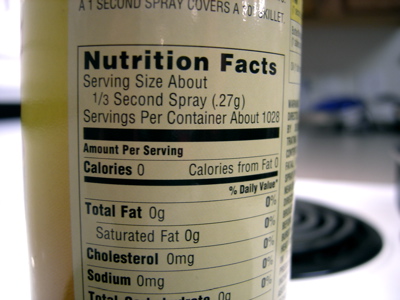
Nutrition Facts on a can of Pam

Priorities
Where we spend our time indicates what is important to us. Do you spend enough time with your family and close friends? Do you spend more time reading books or blogs? TV or exercise? Do important projects get enough attention or is your time eaten up by unimportant tasks?

From Henry David Thoreau (via Quoty):

It is not enough to be busy; so are the ants. The question is: What are we busy about?

Choose a good password

You’ve heard over and over the importance of choosing a good password, but we all seem to keep the same bad habits. Roger Grimes analyzed 34,000 real passwords and discovered some interesting trends:

  • As expected, English vowels are by far the most frequent occurring password symbols.
  • [In passwords with numbers,] the number 1 appeared 45 percent of the time, followed by the number 2 (22 percent.)
  • The exclamation point was the most commonly used non-alphanumeric character.
  • Words, colors, years, names, sports, hobbies, and music groups were very popular.
  • Other popular words include: angel, baby, boy, girl, big, monkey, me, and the.
  • Names of sports — golf, football, soccer, and so on — were as popular as professional sports teams and college team nicknames

Drawing on this study and other wisdom, here are some tips for choosing a good, secure password. Read #8 if you don’t read them all:

  1. Don’t write your password on a sticky note attached to your monitor (or “hidden” under your keyboard.)
  2. Don’t choose anything obvious like your birthday, spouse name, etc.
  3. Don’t choose any single word you can find in a dictionary.
  4. Don’t use the same password on a secure site (like your bank) as on an insecure site (like a mailing list.) If someone discovers your password because it was emailed to you from an insecure site, you don’t want your bank account to be vulnerable. Ideally you’d keep a different password for each site.
  5. If a digit is required in your password, don’t simply append a “1″ or a “2″. If a symbol is required, don’t simply append an exclamation point.
  6. Learn which channels are secure and which are not. Generally HTTP, FTP, and VNC are not secure, while HTTPS, and SSH are secure. Don’t use secure passwords on insecure channels. (Look for the padlock in your browser.)
  7. Pick a password you can remember, so you won’t have to write it down.
  8. Pick a LONGER password. Think of a phrase or sentence or haiku, not a word. Password length is more important than symbols or numbers. For a security expert like Mr. Grimes, a 6-9 character password with “complexity” (symbols, numbers) is fairly easy to break, while a password with 15+ characters is almost impossible to break.

Eventually, we may be using our fingerprints or some other biometric procedure, but until then, choose a good password.